When investing in a security setup, one of the most common questions homeowners and business owners ask is: how long does a cctv camera store footage?” The answer depends on several factors, including storage capacity, recording settings, and system configuration.
Understanding footage retention is essential because recorded video is only useful if it’s still available when you need it. Whether you’re monitoring your home or business, knowing how long your camera keeps data can help you design a more effective security plan.
What Determines CCTV Footage Storage Time?
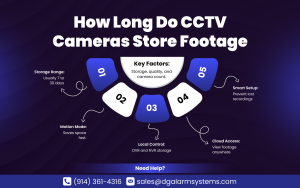
There isn’t a single fixed answer. Storage duration depends on how your cctv camera system is configured.
Key Factors That Affect Storage
- Hard drive capacity
- Video resolution
- Frame rate
- Continuous vs motion recording
- Number of cameras connected
- Compression format
The larger the storage and the lower the recording intensity, the longer your footage remains accessible.
Average Storage Time for CCTV Systems
Most residential systems store footage for:
- 7 to 14 days (basic setups)
- 14 to 30 days (standard systems)
- 30 to 90 days or more (large storage capacity)
A typical home camera system with a 1TB hard drive and 4 cameras recording in HD may store about 2–3 weeks of footage before overwriting old data.
Continuous Recording vs Motion Detection
The recording mode plays a major role in how long a cctv camera keeps video files.
Continuous Recording
- Records 24/7
- Uses more storage
- Shorter retention period
Motion-Based Recording
- Records only when movement is detected
- Saves storage space
- Extends footage retention
Switching to motion detection can significantly increase how long your camera preserves data.
Storage Types Explained
Different systems store data in different ways.
1. DVR (Digital Video Recorder)
Often used with wired cctv security cameras, DVR systems store footage locally on a hard drive.
2. NVR (Network Video Recorder)
Common in IP-based systems, NVRs offer higher resolution and better compression.
3. Cloud Storage
Some modern systems upload footage to secure servers, extending storage options beyond local hardware limits.
Each option impacts how long your camera retains footage.
How Resolution Affects Storage
Higher resolution equals clearer footage—but also larger file sizes.
| Resolution | Storage Usage | Approximate Retention (1TB, 4 Cameras) |
| 720p | Low | 30–45 days |
| 1080p | Moderate | 14–21 days |
| 4K | High | 7–10 days |
Choosing the right resolution ensures your camera balances clarity and storage efficiency.
Number of Cameras Matters
The more cameras connected to your cctv camera, the faster storage fills up.
For example:
- 2 cameras = longer retention
- 8 cameras = shorter retention
If you expand coverage, consider upgrading storage capacity to maintain the same retention period.
Can You Extend Storage Time?
Yes, there are several ways to increase how long a cctv camera stores footage.
Upgrade Storage Hardware
- Install a larger hard drive
- Add additional storage drives
- Use external backup systems
Adjust Recording Settings
- Lower frame rate
- Reduce resolution slightly
- Enable motion-only recording
These adjustments can extend retention without sacrificing critical footage.
Cloud Storage vs Local Storage
Cloud storage offers flexibility but may involve subscription fees.
Local Storage Pros
- One-time cost
- Full control
- No internet dependency
Cloud Storage Pros
- Remote access
- Off-site protection
- Longer retention options
For homeowners comparing home security system costs, cloud storage may increase monthly expenses but offer added convenience.
Legal and Practical Considerations
Some businesses are legally required to store footage for a specific duration. Residential users typically decide based on personal preference and risk assessment.
If incidents are rare in your area, 14–30 days may be sufficient. However, higher-risk properties may benefit from longer retention.
Outdoor Cameras and Retention Needs
Outdoor devices, especially the best cctv outdoor camera units, often capture high-motion environments.
This can impact storage because:
- Motion triggers occur more frequently
- File sizes increase
- Storage fills faster
Optimizing sensitivity settings helps reduce unnecessary recording.
Signs Your Storage Isn’t Enough
If your cctv camera overwrites footage before you can review it, you may need an upgrade.
Warning signs include:
- Footage disappears within days
- System displays storage full alerts
- Important clips are missing
- Frequent overwriting notifications
Regular system checks prevent unpleasant surprises.
Integrating Cameras With Smart Systems
Modern smart security systems allow remote monitoring and flexible storage options.
Integration benefits include:
- Real-time alerts
- Cloud backups
- Automated storage management
- Mobile app control
Combining surveillance with the best security alarm system enhances overall protection.
Professional Installation and Setup
Improper configuration can limit retention capacity.
Professional cctv camera installation ensures:
- Correct compression settings
- Optimal hard drive configuration
- Efficient network setup
- Balanced resolution and frame rate
Working with experienced providers helps maximize storage without compromising quality.
Typical Storage Scenarios
Here’s a quick breakdown of common setups:
- Small home (2–4 cameras): 2–4 weeks storage
- Medium home (4–6 cameras): 10–21 days
- Large property (8+ cameras): 7–14 days
The exact duration depends on settings and hardware.
Maintenance Tips for Better Storage Performance
To keep your camera functioning efficiently:
- Check hard drive health annually
- Update firmware regularly
- Test playback periodically
- Back up important footage immediately
Preventative maintenance extends both storage reliability and equipment lifespan.
Final Verdict
So, how long does a cctv camera store footage? The answer depends on storage capacity, recording settings, and system design. Most home systems retain video for 7 to 30 days, while expanded setups can significantly extend retention.
By adjusting resolution, enabling motion recording, and upgrading storage, you can tailor your system to your needs. Whether you prioritize long-term archives or short-term monitoring, understanding your storage capabilities ensures your footage is available when it matters most.
A properly configured system doesn’t just record events—it preserves peace of mind.
If you’re unsure whether your current system provides enough retention, D & G Alarm Systems can help evaluate and optimize your setup. Their expertise ensures your cameras and storage solutions work together seamlessly for maximum reliability.
Contact us at (914) 361-4316 or email sales@dgalarmsystems.com today to explore smarter, more efficient surveillance options tailored to your property.
Frequently Asked Questions (FAQs)
1. How many days of footage does a typical home CCTV system store?
Most home systems store between 7 and 30 days, depending on settings and storage size.
2. Does higher resolution reduce storage time?
Yes, higher resolution footage takes up more space and reduces retention length.
3. Can I upgrade storage on my existing system?
In most cases, yes. You can install larger hard drives or add cloud storage.
4. What happens when storage fills up?
Most systems automatically overwrite the oldest footage first.
5. Is cloud storage better than local storage?
Cloud offers remote access and off-site protection, but may increase monthly costs.